Pre-Built Demos

SaaSio comes with a beautiful collection of modern, easily importable, and highly customizable demo layouts.

SaaSio Main
Online Payment
Digital Agency 2023
Digital Marketing 2023
NFT 2023
SaaS 2023
IT Solution 2023
Help Desk
IT solution 2023 (V.2)
Law Firm
Cryto Currency
SaaSio NFT
SaaS Classic
SaaS Modern
Digital Agency
Marketing Agency
Digital Marketing
App Landing
Digital Agency 2
Business Consult-4
Personal Portfolio
Creative Studio
IT Solutions-3
Business & Finance
Digital Agency
Business Consulting
Digital Agency
Finance Consulting
Marketing
Gym Fitness
Education
Travel Agency
It solution-2
Business Consult-1
Business Consult-2
Business Consult-3
HR Management
CR Management
Social Media Marketing
Software Management
Cyber Security
Email Marketing
Web Application
SEO Agency
Resturannt
IT Solutions-1
Digital SEO
Startup Agency
Dark Version Demo
SaaSio Main (Dark)
Dark Version Demo
SaaS Classic (Dark)
Dark Version Demo
Digital Agency (Dark)
Dark Version Demo
StartUp Agency (Dark)
Dark Version Demo
HR Management (Dark)
Dark Version Demo
SMM (Dark)
RTL Version Demo
SMM (RTL)
RTL Version Demo
Digital Agency (RTL)
RTL Version Demo
SaaSio Main (RTL)
RTL Version Demo
HR Management (RTL)
RTL Version Demo
CR Management(RTL)
Sign In Get started

Resources' Skills

Your resources need skills to accomplish a variety of jobs or job functions; they need specific abilities, knowledge, and expertise to do so. Some may be technical skills, like web development or programming, while others may be interpersonal skills, like teamwork and communication.

To maximise productivity and efficiency, this section will help you in matching the skills and expertise of your resources with the tasks and projects that require them.

Prerequisites to view the Resources' Skill reports

  1. You must have selected the workforce option in the plan.
  2. You must have an manager or the admin account which by default contains the permissions to view this report.
  3. PerXL client programme must be installed on the user's computer.
Newly adapted skills

The abilities that a resource gains or develops as a result of training, education, or experience. These abilities may be associated with new technologies or work processes, among other things. Because rapid technological advancement requires your workforce to remain competitive and relevant, it is necessary to meet changing business needs. New skills can benefit both resources and organisations.

How to view newly adapted skills?

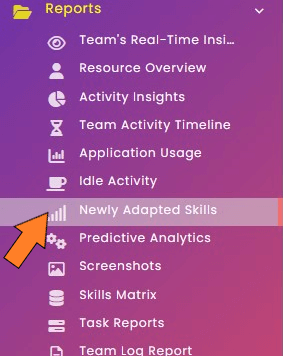
  1. Choose the icon for reports from the sidebar menu. A drop-down menu will show up.
  2. Or you can select Report button at the bottom of the sidebar menu.
  3. From the menu, select the Newly Adapted Skills icon.
  4. A New page will appear with the heading Newly Adapted Skills.
  5. Choose from the available options the name of the resource and the start and the end date.
  6. After selecting the above options the skill sheet will be available to view with all the information about the skills of the selected resource.
  7. Note: You can download this report in excel format or as a PDF by selecting one of these choices at the top of the current page, or you can just select the print option to directly print it.

Skills Matrix

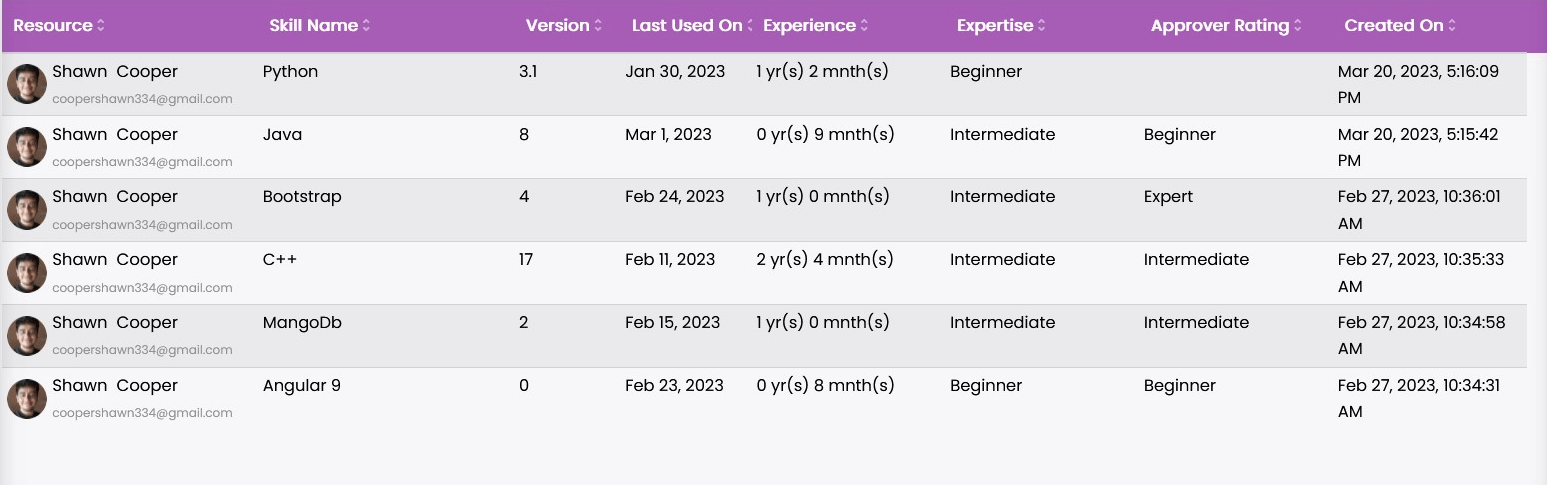
A skill matrix is a useful tool for assessing resources' skills and expertise by identifying skill gaps, which can then be filled by the organisation through targeted training and development opportunities. This would aid in resource allocation and strategic planning.

How to view the "Skills Matrix"?

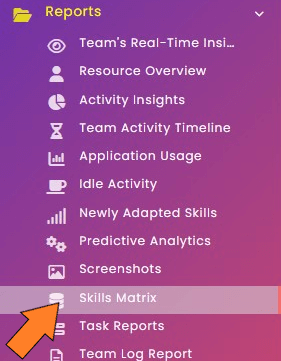
  1. Choose the icon for reports from the sidebar menu. A drop-down menu will show up.
  2. Or you can select Report button at the bottom of the sidebar menu.
  3. From the menu, select the Skills Matrix icon.
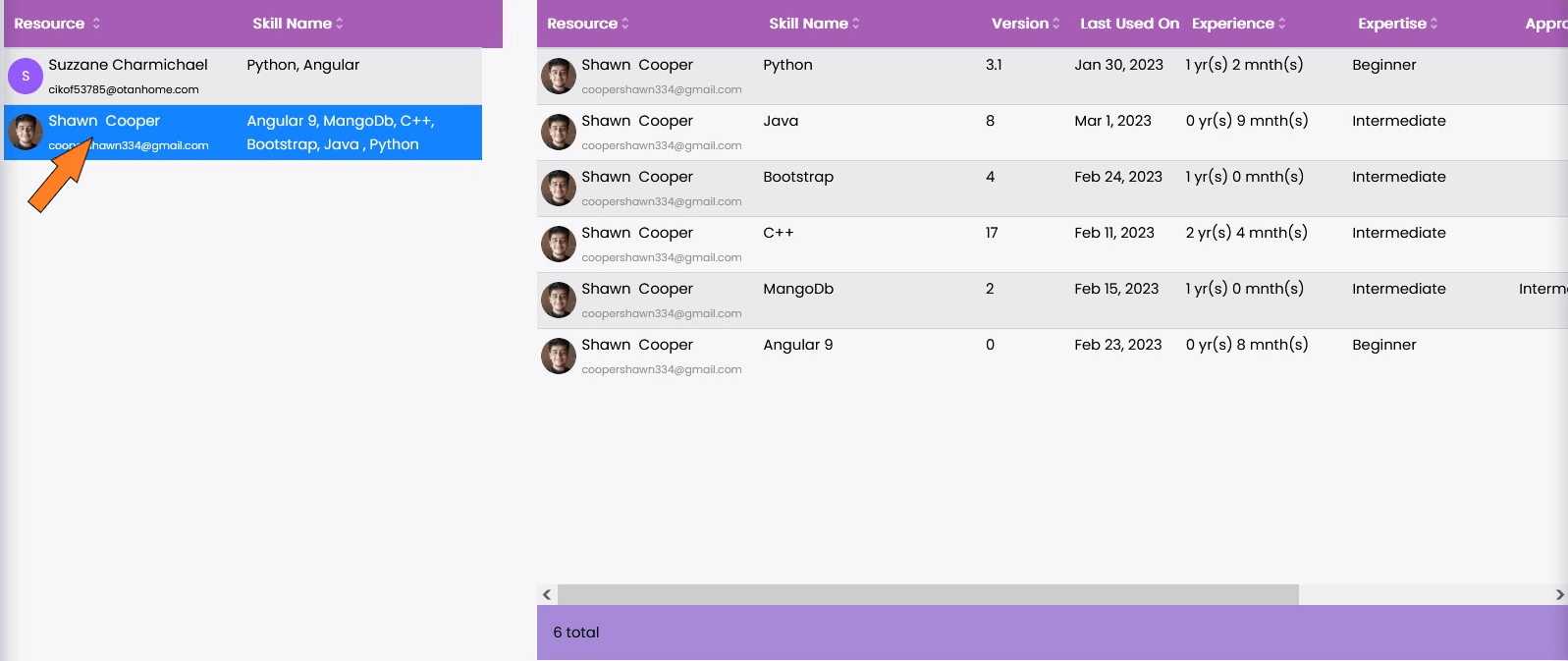
  4. A New page will appear with the heading Skills Matrix.
  5. Choose from the available options the name of the resource(s) and the name of the skill(s).
  6. After selecting the options you will be presented with the name of the resources on the left side of the page and by clicking on any resource name you can view detailed view of their skills.
  7. Note: Using the same icon as above given section you can view this report as spreadsheet or print it.